Become an Affiliate
  CMB ULTRA CD
  How To Order
  CMB F.A.Q.
  Product Listing
  Get Our Newsletter!
  Other Links 
Google

Most Popular!
   CMB ULTRA CD    
  Presentation Publisher
  A+  Web Show Maker
  1 Click Unzip!
  SlideShow Ultra
  Snowflake Screen Saver
  Christmas Scenes
  Christmas Breakout
  A+ Email Spam Filter

Christmas Software!
  Snowflake Screen Saver
  Christmas Scenes
  Christmas Breakout
  Christmas Music
  Flying Christmas
  Merry Christmas
  Yuletide Scenes

Multimedia

  1st Look
  A+  Web Show Maker
  A+ Web Screen Saver
  CMB Audio Player
  Picture Saver
  Presentation Publisher
  SlideShow Ultra
  SlideShow Ultra Packager
  SlideShow Ultra Pic Packs
  SlideShow Ultra Player

Utilities
  1 Click Unzip!
  A+ Email Spam Filter
  CMB Audio Player
  Fish&Log!
  Password Pro
  Top 10 Bar
  Quick Tray

Screen Scenes

  Screen Scenes Home
  Beautiful Nature Vol 1
  Beautiful Nature Vol 2
  Bird Scenes Vol 1
  Bird Scenes Vol 2
  Bird Scenes Vol 3
  Bird Scenes Vol 4
  Bird Scenes Vol 5
  Butterfly Scenes
  Christmas Scenes
  Cats! Vol 1
  Cats! Vol 2
  Clouds Vol 1
  Clouds Vol 2 
  Deer Scenes
  Flowers Vol 1
  Flowers Vol 2
  Flowers Vol 3
  Flowers Vol 4
  Flowers Vol 5
  Flowers Vol 6
  Golf Scenes
  Lightning Scenes
  Lions & Tigers
  Military Aircraft Vol 1
  Military Aircraft Vol 2
  Military Scenes Vol 1
  Mountain Scenes Vol 1
  Mountain Scenes Vol 2
  N. American Scenics Vol 1
  N. American Scenics Vol 2
  N. American Scenics Vol 3
  N. American Scenics Vol 4
  Ocean Scenes
  Pups!
  Scenic Coastlines Vol 1
  Scenic Coastlines Vol 2
  Scenic Coastlines Vol 3
  Space Volume 1
  Space Volume 2
  Space Volume 3
  Sunsets Volume 1
  USA Scenes Vol 1
  USA Scenes Vol 2
  Views Of Earth Vol 1
  Views Of Earth Vol 2
  Volcanoes Vol 1
  Volcanoes Vol 2
  Waterfalls Vol 1
  Yuletide Scenes
  Yuletide Scenes Vol 2

Animated Screen Savers
  Balloons And Mountains
  Bouncing Golf Balls
  Breakout Screen Saver
  Christmas Breakout
  Corporate Logo
  Fish Screen Saver
  Flying Christmas
  Flying Golf Saver
  LogoScreenSaver98
  Merry Christmas
  Pong Saver
  Popcorn Screen Saver
  Scenic Falling Leaves
  Snowflake Screen Saver
  Ultra Space

CMB Software
  Become an Affiliate
  CMB ULTRA CD
  CMB Wallpaper CD
  Home Page
  How To Order
  Contact Information
  Customer Support
  CMB F.A.Q.
  Product Listing
  Get Our Newsletter!
  Other Links


Download and try out this program for free! Click Here

Product Name:

Quick Tray                                                        Click here to download this program onto your computer!

System Requirements:

Windows 95-98-2000-NT
Who uses this program: Users who want the ease of organizing all of their most
frequently run tools into 1 system tray that is accessible
at any time from the desktop.

"Simple, elegant, yet powerful enough to launch all of my important files!"
Brian Benahen - OH

Click here to download this program onto your computer!

It's super easy to create a shortcut for use with Quick Tray. Select a file (or type in a website) and then define a name for the shortcut!
It's easy to create shortcuts to your favorite files or web sites!

Quick Tray saves valuable desktop space by living in your system tray. You activate your shortcut list by "right clicking" the mouse!
(Quick Tray sits in your system tray.)

ball1.gif (177 bytes) Create shortcuts to any file on your system

ball1.gif (177 bytes) Create shortcuts to your favorite web sites

ball1.gif (177 bytes) Uses very little system resources

ball1.gif (177 bytes) 1 Click Shortcut launching

ball1.gif (177 bytes) Pass parameters to each shortcut

ball1.gif (177 bytes) Selectable window state for each shortcut

ball1.gif (177 bytes) Easy to use user interface

ball1.gif (177 bytes) Frees up valuable desktop space!


Click here to register this program online 24 hours a day!

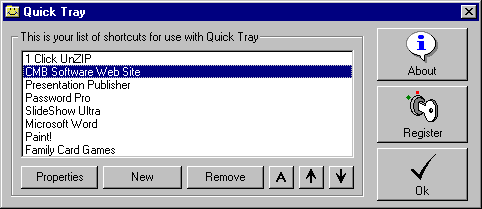
Quick Tray - Finally an easy to use shortcut tool that lives in the system tray! Easily define a list of shortcuts that can be launched with just a click of the mouse from your system tray. Simply right click the mouse over the Quick Tray icon and your list of shortcuts will be immediately available. Left click the mouse to bring up the Quick Tray configuration screen (shown above) where you can edit or create new shortcuts. Perfect for users who want to save valuable desktop space. Great for power users who need a quick way to launch the favorite tools.

Click here to download this program onto your computer! Related Links:
Password Pro - Create and maintain password lists for multiple users.
Top 10 Bar - Configure your favorite programs to run with a single click!
24 Hour Online Registration - Click here to register this program right now!
Click here to download this program onto your computer!

CMB ULTRA CD!

CMB Software